top of page
%20(1).png)
Steps to Activate WA Contact Extractor Premium
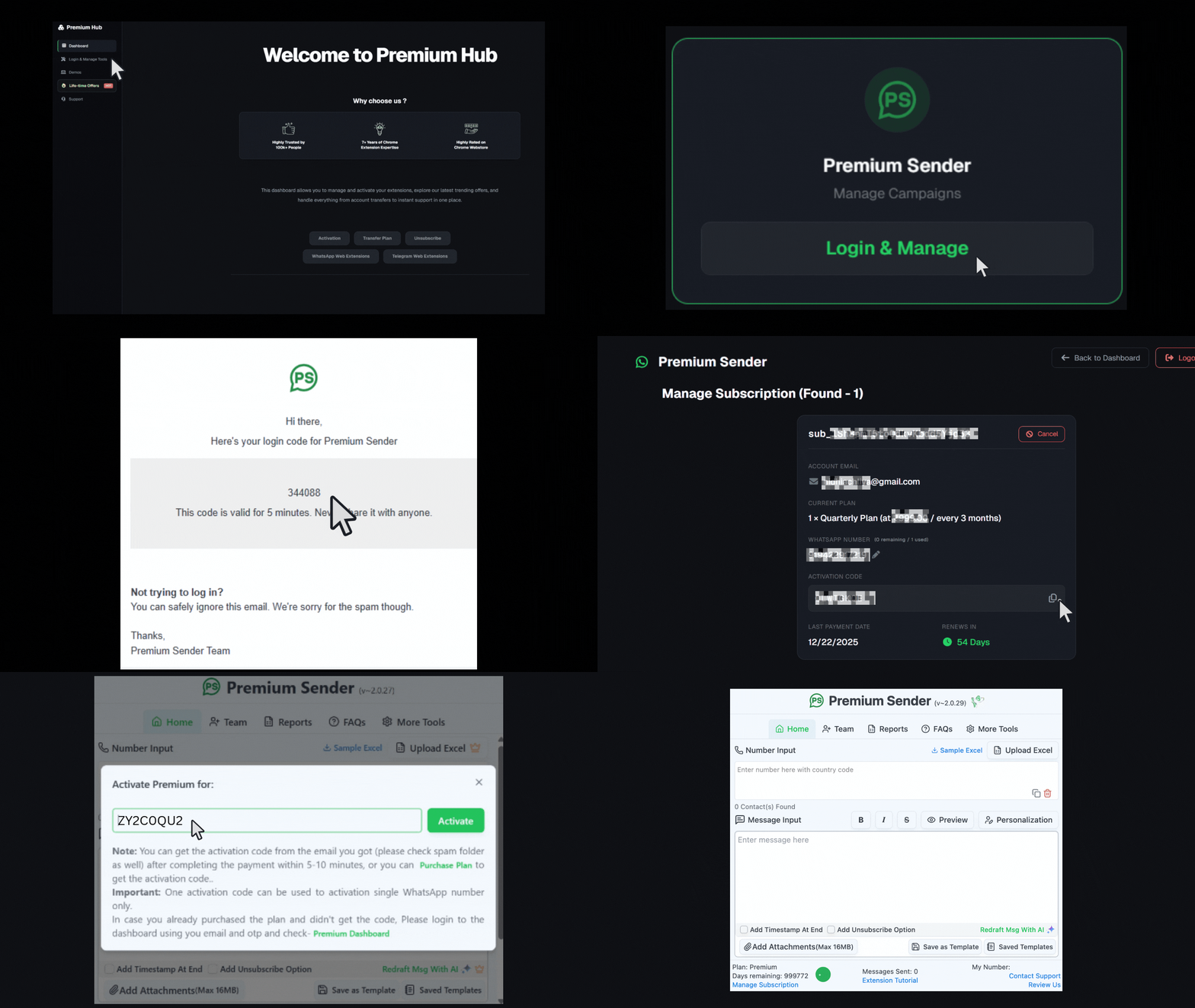
Step 1: Open the Website and Go to Dashboard
Go to the official website and click the Go to Dashboard button in the top right corner.
.png)
Step 2: Go to Login & Manage
Click on the Login & Manage tab within the dashboard. Locate your extension card and click "Login & Manage." Enter your payment email and click "Send OTP."
.png)
.png)

Step 3: Paste the OTP
Paste the OTP into the field and click Submit.


Step 4: Copy Activation Code
Once logged in, locate the Activation Code field (e.g., FNEV...) in the subscription panel and click the copy icon next to it.

Step 5: Open extension and paste the code
Open the extension. Click on "Already Purchased? Enter Code." Paste the code into the activation field and click Activate. Your subscription is now successfully activated. Enjoy using your extension!

.png)

More WhatsApp Web Tools by Premium Hub!
.png)

.png)

bottom of page